

I Run My Coding Agents in the Cloud, Not on My Laptop
Language Mismatch Disclaimer: Please be aware that the language of this article may not match the language settings of your browser or device.
Do you want to read articles in English instead ?
TL;DR
What: I run Claude Code (and Codex) as cloud agents. I comment @claude on a GitHub issue, a cloud VM picks it up, does the work next to my infrastructure, and opens a pull request. Why: my laptop was the bottleneck, bandwidth, battery, one agent at a time, and the whole thing died when I closed the lid. I also wanted to grant real autonomy without risking everything. How: each session runs on its own AWS VM (cloud-to-cloud), several in parallel, with enough permission to act, scoped and locked to one project, with staging and reviewed merges as the safety net. Proof, up front: in the last two weeks this setup produced 937 commits across 16 worktrees, with some pull requests going from open to merged in 4 minutes.
Why I Run Agents in the Cloud, Not on My Laptop
For a while I ran coding agents the obvious way: Claude Code in a terminal on my laptop. It worked, but the laptop was quietly limiting everything. Moving the agents into the cloud fixed five things at once.
- Stop being the bottleneck. An agent spends most of its wall-clock time on tool calls, not on thinking. Run those next to the repo and your home uplink is no longer the ceiling.
- Multiply yourself. One agent at a time is a throughput cap. In the cloud I launch one per ticket and come back to a stack of finished pull requests.
- Real autonomy, not babysitting. I give an agent enough permission to act on my behalf so it finishes multi-step work without me approving every command.
- Contained blast radius. Each agent is scoped and locked to a single project, so "give it permissions" does not mean "risk everything."
- Proof it ships. This is not a demo. I will show you the tickets it merged and how fast.
The rest of this post is how each of those works, with the real setup and the numbers.
Cloud-to-Cloud: Why Bandwidth Stops Being the Limit
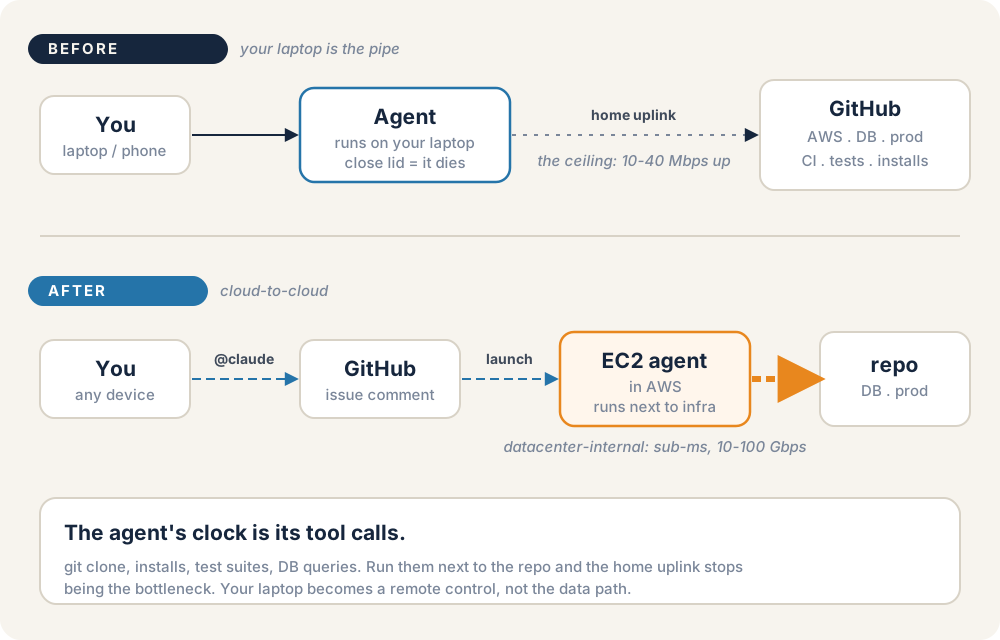
Where the agent runs decides what its slow part is.
Here is the mental shift. When the agent runs on your laptop, every git clone, every npm install or composer install, every test run and database query is gated by your home connection: maybe 10 to 40 Mbps up, tens of milliseconds of round-trip, and asymmetric. Large repos and dependency installs serialize against that pipe, and your machine is busy the whole time.
When the agent runs in the cloud, next to the repo and the database, those same operations travel datacenter-internal links: sub-millisecond, tens of gigabits. The home uplink is out of the loop entirely. And because nothing runs on your laptop, you can close the lid and walk away while the agent keeps going. One writeup comparing Codex cloud and local execution puts it the same way: a place to "walk away while the agent works" and parallelise across tasks, at roughly a 5x cost premium over local execution. Warp makes the locality explicit with a split-plane design where "agents run close to your repository".
I want to be honest about the claim: I have not found a clean head-to-head latency benchmark, and for very short single-shot completions, local inference actually wins because there is no network hop to the model. The cloud advantage is not raw model latency. It is tool-call locality plus the freedom to walk away, and for real, multi-step tickets that is what dominates the clock.
One Comment, a Fleet of Agents
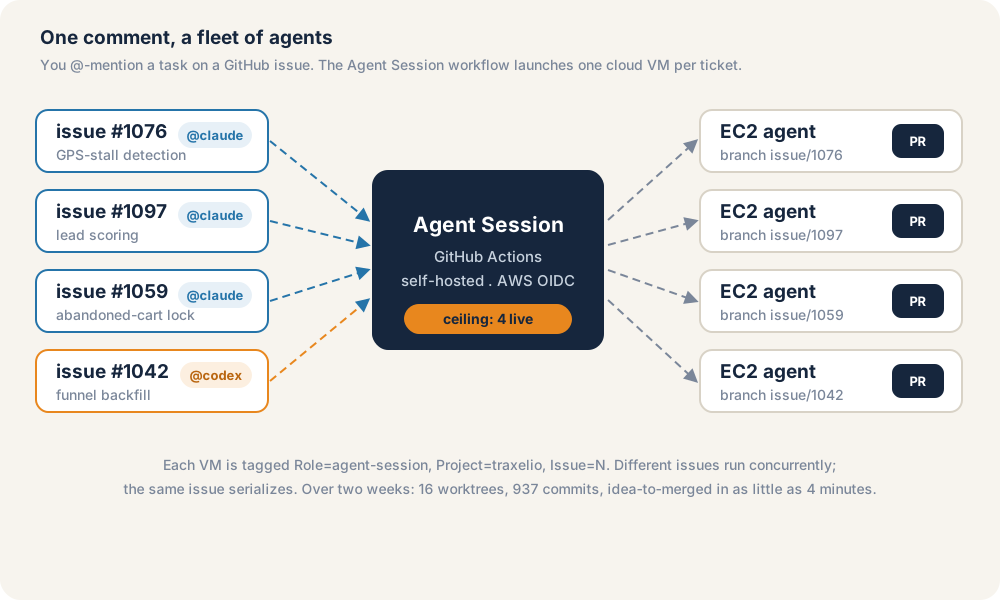
A GitHub comment is the trigger. One cloud VM per ticket is the result.
The interface is the most familiar thing I own: a GitHub issue. I comment @claude fix the GPS-stall false positives on the issue, even from the GitHub app on my phone. The repo reacts with an eyes emoji, replies "On it, routing your request...", and a minute later a cloud VM is working the ticket.
That is a real GitHub Actions workflow (.github/workflows/agent-session.yml). Trimmed to the parts that matter:
on:
  issue_comment: { types: [created] }
  issues: { types: [opened] }

concurrency:
  group: agent-session-${{ github.event.issue.number }}
  cancel-in-progress: false

jobs:
  launch:
    runs-on: [self-hosted, ci-bootstrap]
    if: >
      github.event.comment.user.login == 'babacarcissedia' &&
      ( startsWith(github.event.comment.body, '@claude')
        || startsWith(github.event.comment.body, '@codex') )
    permissions:
      id-token: write   # assume a scoped AWS role via OIDC
      contents: read
      issues: write
The job runs on a self-hosted runner, assumes a scoped AWS role over OIDC, and launches a dedicated EC2 instance from a prebuilt image. One issue, one VM. The concurrency group is keyed on the issue number, so the same ticket serializes (no two agents fighting over one branch) while different tickets run side by side.
There is a deliberate cap so a fleet of agents does not become a fleet of surprise bills:
MAX="${AGENT_SESSION_MAX:-4}"   # how many live cloud sessions at once
# ...if the fleet is at capacity, it tells me on the issue and stops.
This is the same shape the vendors now ship as a product. Anthropic's Claude Code on the web runs sessions "on Anthropic-managed cloud infrastructure," lets you "run multiple tasks in parallel across different repositories," steer mid-task, and do it from the iOS app. OpenAI's Codex cloud lets you "tag @codex on issues and pull requests to spin up tasks," each "in its own cloud sandbox." If you would rather not run the infrastructure yourself, those are the turnkey versions of exactly this.
Fan-out has a real cost, and it is worth stating plainly: Anthropic's own multi-agent research system, which runs a lead agent plus several subagents in parallel, beat a single agent by 90.2% but used about 15x more tokens than a chat. Parallel agents buy speed and coverage. They spend tokens to do it.
Compatible with Both Claude and Codex
Notice the if condition above accepts @claude or @codex. The prompt parser routes one to Claude Code and the other to Codex:
case "$BODY" in
  @claude*) AGENT="claude" ;;
  @codex*)  AGENT="codex"  ;;
esac
This is a nice-to-have, not the point, but it matters: the harness is the workflow, and the agent is swappable. The repo conventions travel too. AGENTS.md has become an open, tool-agnostic standard for "how to work in this repo," adopted across tens of thousands of projects and read by most agents. Claude Code reads it through a simple import inside CLAUDE.md. So the same project can be worked by either agent, and you are not locked to one vendor's roadmap.
Enough Permission to Act for Me
The thing that makes a cloud agent actually useful is that it does not stop to ask. In my sessions the permission mode is set to bypass:
PERMISSION_MODE="bypass" # act without prompting, inside a scoped box
Claude Code has a layered permission model, allow, ask, deny, with a sandbox that can restrict the shell's filesystem and network. The dial runs from "prompt me on everything," through an allowlist, to full bypass (the mode some people call YOLO). On a laptop, full bypass is reckless. The reason I can run it is the next section: the box the agent runs in is disposable, single-project, and locked down, with git and backups as the undo button.
That is the whole trade. Autonomy is only worth granting in proportion to how small you have made the blast radius.
Scoped Down: One Project, Contained Blast Radius
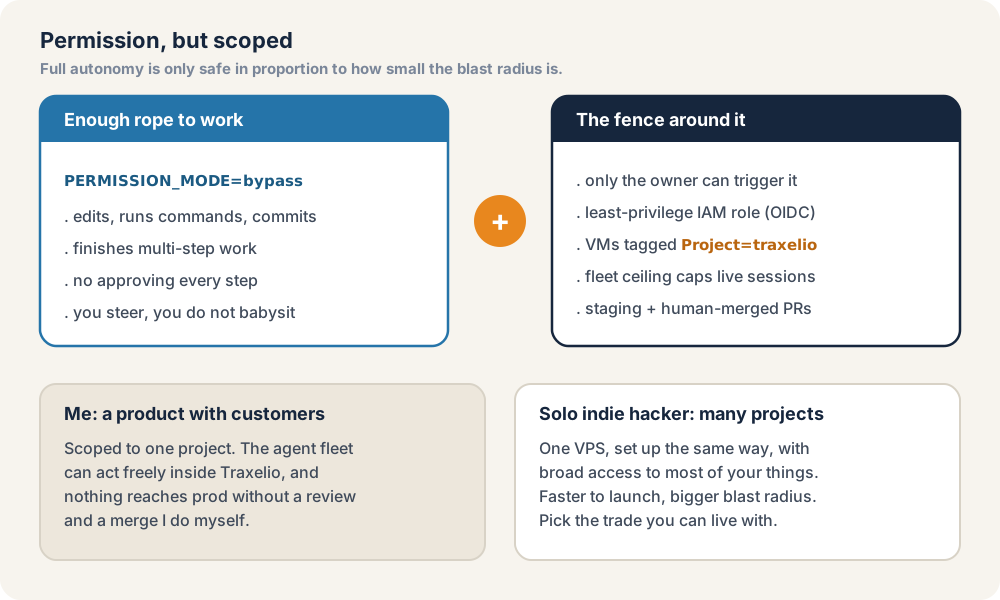
Give the agent enough rope to work. Then build a fence around it.
Here is the fence around the autonomy:
- Only I can trigger it. The workflow checks the commenter's login. A random visitor commenting
@claudedoes nothing. - Least-privilege cloud access. The runner assumes a narrow AWS role over OIDC. It can launch and manage agent VMs and nothing else.
- Every VM is tagged and scoped. Each instance carries
Role=agent-session,Project=traxelio,Issue=N. The fleet is scoped to one project, and the ceiling caps how many run at once. - Production stays gated. The agent works freely inside its box, but nothing reaches production without a pull request I review and merge myself.
This is the documented "safe YOLO" pattern, full autonomy is acceptable specifically because it happens inside an isolated, single-project, network-limited environment with git as the undo. A dedicated cloud box is that isolation primitive at the host level.
I locked mine down to Traxelio, because that is most of what I work on and it is a product with customers. If you are a solo indie hacker launching a lot of small projects, you might instead keep one VPS, set up the same way, with broad access to most of your things. That is faster to launch and a bigger blast radius. Pick the trade you can live with.
"Isn't That Dangerous?" Where I Draw the Line
The honest answer is: it depends on your blast radius, and people draw the line in very different places.
Pieter Levels draws it about as far as it goes. He has coded almost solely on a VPS with Claude Code for about a year ("no need to keep laptop open ever... switch to phone... whenever") and he lets the agent edit production directly: "I have Claude ON production now. It's vibecoding on production." For a solo builder moving fast, the math can work, and he is candid that it rarely goes wrong.
I draw it earlier, because I run a product with customers. The agent never touches production live. It works on a branch, opens a pull request, and I review and merge. Staging deploys on the way. The interesting part is that Levels recommends the same for anyone who is not solo: use a staging server so the agent does not touch production. That is me. We are at two ends of one spectrum, not in disagreement.
The Proof: What It Actually Shipped
None of this matters if it does not ship real work. So here is a two-week window of merged pull requests, measured from the git history, not a highlight reel.
| Ticket | What it shipped | PR open to merged |
|---|---|---|
| #1099 · Intel hub | /intel command hub + 7 subcommands + runbook |
4 min |
| #1100 · GPS-stall hotfix | frozen-position fix + regression tests | 8 min |
| #1097 · lead scoring | email-activity scoring + half-life decay test | 1h 54m |
| #1042 · funnel backfill | sales-funnel attribution backfill | 2h 26m |
| #1059 · abandoned-cart lock | cart-lock guard | 3h 55m |
| #1076 · GPS-stall detection | frozen-position detection + tests | 12h 28m |
The throughput behind that table: 937 commits in 14 days, about 67 a day, peaking at 85. Over the window I cycled 16 worktrees through the fleet, one branch per ticket. Of the pull requests, 60% merged the same day and another 36% the next.
Two caveats so I do not overclaim. The "PR open to merged" column is the review window, not the agent's total working time, which happens before the PR opens. And while the workflow genuinely runs different issues concurrently (per-issue concurrency, a fleet ceiling of four), I am not claiming all sixteen worktrees were live at the same instant. The measured facts are the commit count, the worktree count, and the merge times.
If You Want to Build One
Two routes, depending on how much you want to run yourself.
The turnkey route. Use a managed cloud agent: Claude Code on the web or the iOS app, Codex cloud, or Claude in Slack, where you @-mention a task and it runs in the cloud and opens a PR. This is the fastest way to feel the workflow with zero infrastructure.
The own-the-box route. A cheap VPS, an agent, and a locked-down network. Levels' version is a five-minute setup: a small Hetzner box, npm install -g @anthropic-ai/claude-code, type claude. The part to get right is the lockdown. He installs Tailscale first, then locks the firewall to accept only HTTPS from Cloudflare's IPs and SSH from his Tailscale IP, so nothing else can get in.
On the box, I like one tmux session per project so I can switch between laptop and phone without losing my place. This little function (drop it in ~/.bashrc) attaches to, or creates, a session named after the current folder:
# `tm` attaches to / creates a tmux session named after the current dir.
tm() {
    command -v tmux >/dev/null 2>&1 || { echo "tmux not installed"; return 1; }
    local name="${1:-$(basename "$PWD")}"
    name="${name//./-}"; name="${name//:/-}"   # tmux dislikes . and :
    if [ -n "$TMUX" ]; then
        tmux has-session -t "$name" 2>/dev/null || tmux new-session -d -s "$name" -c "$PWD"
        tmux switch-client -t "$name"
    else
        tmux attach -t "$name" 2>/dev/null || tmux new -s "$name" -c "$PWD"
    fi
}
One more thing, whether or not you let an agent near your server: keep real backups. I run 3-2-1, multiple copies, on-site and off-site. The cost is tiny next to losing the work.
Where This Is Going
I am not the only one who thinks this is the default, not a hack. Andrej Karpathy called the async cloud teammate the "3rd major redesign of LLM UI/UX", an LLM that is "a self-contained, persistent, asynchronous entity" working alongside teams of humans, rather than a website you visit. Sahar Mor's writeup on cloud coding agents frames it cleanly: you assign a task, the agent "spins up its own environment in the cloud (as if it had its own laptop)," makes changes, and opens a pull request for you to review. Simon Willison has been cataloguing the same shift, and commentators like Theo have been calling it for a while.
The pattern underneath all of it is the same one in this post: the agent lives in the cloud, next to the work, and your laptop becomes the remote control.
What You Can Take from This
- Run the agent in the cloud, next to the repo, so its tool calls stop waiting on your home uplink and you can close the lid.
- Make the trigger boring and familiar. A GitHub comment (or a managed cloud agent) means you can start work from your phone.
- Go parallel with a ceiling. One VM per ticket multiplies your throughput; a fleet cap keeps the bill sane.
- Grant real permission, then scope it. Full autonomy is fine in proportion to how small and disposable the box is.
- Keep production human. Staging and reviewed merges are cheap insurance, and even people who vibecode on prod recommend them once you have customers.
- Measure it. If you cannot point to the tickets it shipped and how fast, you are guessing.
I moved my agents to the cloud so I could start a ticket from my phone and stop carrying my laptop everywhere. What I got was more throughput than I had as one person at one keyboard, with a blast radius I can actually reason about. For a workflow file and a locked-down box, that is a good trade.
That one-person, own-it-end-to-end mode is the same one I bring to any senior software engineering engagement, cloud agents or not.
Further Reading
- Claude Code on the web: https://claude.com/blog/claude-code-on-the-web
- Claude Code permissions: https://code.claude.com/docs/en/permissions
- Claude Code git worktrees (parallel agents): https://code.claude.com/docs/en/worktrees
- Anthropic, how we built our multi-agent research system: https://www.anthropic.com/engineering/multi-agent-research-system
- OpenAI Codex cloud: https://developers.openai.com/codex/cloud
- AGENTS.md, the open agent-instructions standard: https://agents.md
- Sahar Mor, the rise of cloud coding agents: https://www.aitidbits.ai/p/cloud-coding-agents
- Pieter Levels' VPS + Claude Code setup: https://levels.io/daily-laptop-iphone-vps-claude-code-setup